Data merge for InDesign.
Rebuilt from scratch.

Visual workflows, multi-sheet data, vector barcodes & QR-Codes – everything InDesign's data merge should have been. Only better.
macOS only (13.x), InDesign 2024 or higher

How it works

DATAMERGESTUDIO

Data merge, done right.

Every feature you asked for, and a few you didn't know were possible.
THE PROBLEM

InDesign's data merge is broken

You already know it.

1
It breaks. Constantly.
Overset text, missing images, formatting disasters – discovered only after generating 500 pages.
2
Zero conditional logic.
Something misses in database. Set alternatives? Not possible. Your database must be perfect.
3
Completely blind.
No preview, no validation. Hit merge, pray, then spend hours checking output manually.
4
Tables? Not possible.
Master-detail data, product specs, line items in a table – InDesign simply cannot do it.
5
One flat file. No joins.
No multi-sheet support, no table relationships. One CSV, one merge, one headache.
6
Data changes kill your setup.
A column renamed, a sheet added, the layout updated – and you start from scratch every time.
EASE OF USE

Made for people,
not programmers.

DataMergeStudio is built around the principle that complexity should be invisible – and every user should feel confident from day one.
NEW
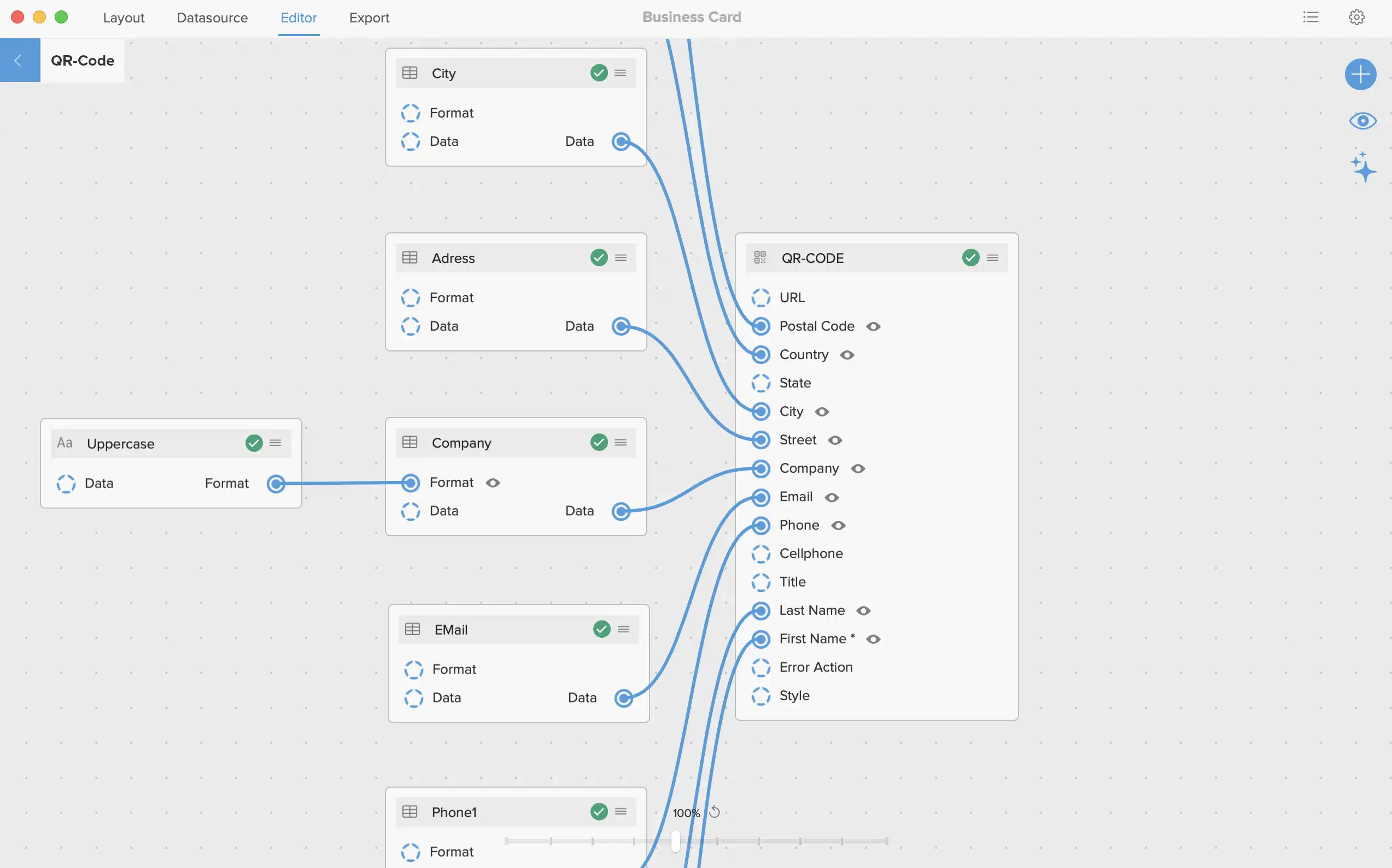
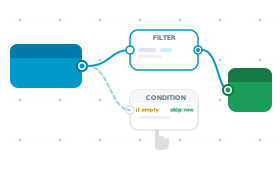
Visual Node editor
Drag-and-drop workflow canvas. See your entire merge logic at a glance – no cryptic dialog boxes.
NEW
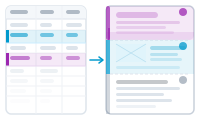
Layout flow – dynamic Layouts
Define dynamic sequences of layout blocks e.g. text, table, image with text, QR-Code etc. (or any individual combination) that flow as anchored objects into a single story. Control page, column, and frame breaks between Blocks – per record, automatically - to create data controlled catalog layouts. Easily.
NEW
AI-Assisted Setup
AI support helps you configure complex workflows without leaving the app.
NEW
Data Based Layer Selection
A field value decides which InDesign layers are visible in each output document. One template, unlimited variants – language, color, edition – fully driven by your data. Requires one document per record.
NEW
Variants
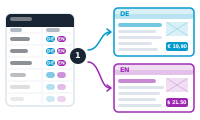
Merge two version variants in a single run. One dataset with side-by-side columns, one Layout, two finished documents — e.g. one in German, one in English. No second project, no duplicate template, no manual switching. Same logic for currency variants, regional editions, or anything else where one source produces two outputs.
NEW
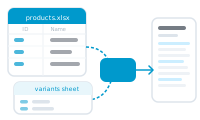
Multi-Sheet & Foreign Keys
Connect multiple Excel sheets with relationships between them. Build master-detail structures – one product with multiple variants – that flow into InDesign tables.
FULL THROTTLE

And then we kept going.

Because the goal was never "slightly better."
NEW
Pagination Module
Documents grow automatically as data fills pages. New pages inherit your master spread – or switch to a different one mid-flow (in layout flow mode). No manual page management, ever.
NEW
Hyperlinks
Add clickable hyperlinks to any element — text, image, barcode, QR code — driven by your data. One column with URLs, every record becomes interactive. Perfect for catalogs that link to product pages, business cards that link to portfolios, or labels that scan to landing pages. Requires interactive PDF selected in export.
NEW
Vector Barcodes - 20 formats
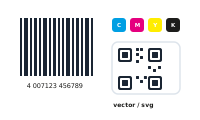
Resolution-independent vector output for barcodes and QR codes. Full CMYK support including EAN-13, Code 128, UPC-A, ISBN and 16 more. Print-ready, zero post-processing.
NEW
Multi-Level Sorting
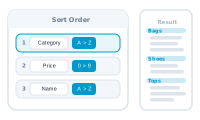
Layered sort keys – sort by category, then by price, then by name. Stacked sort logic that goes far beyond a single field sort.
NEW
Imposition Layouts
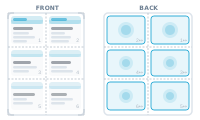
Place multiple records on a single sheet - front and back. Define exact positions for each card or label, and DataMergeStudio fills every slot automatically. Perfect for business cards, labels, and postcards.
NEW
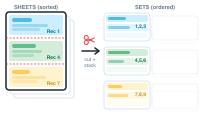
Cut & Stack Imposition
A prepress operators best friend. Pre-sort imposition sheets so that after cutting and stacking, every pile is in the correct order. Multiple sort strategies included – ready for professional print finishing workflows.
NEW
Document Base – Multiple Projects
Manage all your merge projects in one place. Switch between clients, layouts, and data sources instantly – each with its own settings, mapping, and history.
NEW
Scripting Support
Automate DataMergeStudio with AppleScript. Open projects, swap data sources, and trigger merges from Automator, Shell scripts, or any workflow tool – fully unattended.
NEW
Resilient Mapping
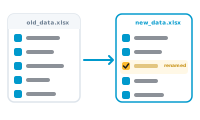
When your data source or layout changes, DataMergeStudio's mapping system transfers your configuration intelligently. No more starting from scratch after a column rename.

Pricing

Early-bird pricing. For the first 100 customers.
Start today and keep your rate for as long as your subscription stays active. Studio is €39/mo (billed yearly); at launch it goes to €49. Lock it in now, keep it for good.

Solo

For one person, on up to 2 Macs.

Loading…
  • 1 seat
  • 2 devices per seat
  • All Core merge features
  • Email support
Bestseller

Studio

For one person, with the full feature set. 30-day free trial.

Loading…
  • 1 seat
  • 2 devices per seat
  • All Core merge features
  • All Advanced merge features
  • 30-day free trial — cancel any time
  • Priority email support

Team

For teams of 2 or more. Domain-restricted invitations, central seat management.

Loading…
  • 2+ seats (€30.00 per seat)
  • 2 devices per seat
  • All Core merge features
  • All Advanced merge features
  • All Enterprise features
  • Priority email support
Save 12% per seat*

*Compared to Studio tier

We'll create your account automatically after checkout and email you a "set password" link.

Features

Feature Solo Bestseller Studio Team
Core features
Import .xlsx files – no Microsoft Excel requiredImport Excel file with their sheets (Solo Tier one sheet, Studio Tier multiple sheets)
Import from CSV with custom delimiters & encodings
Filename-only references (no full path needed)Filenames (e.g. for images) in your datasource are enough - you don\\\\\\\\\\\\\\\\\\\\\\\\\\\\\\\\\\\\\\\\\\\\\\\\\\\\\\\\\\\\\\\\\\\\\\\\\\\\\\\\\\\\\\\\\\\\\\\\\\\\\\\\\\\\\\\\\\\\\\\\\\\\\\\\\\\\\\\\\\\\\\\\\\\\\\\\\\\\\\\\\\\\\\\\\\\\\\\\\\\\\\\\\\\\\\\\\\\\\\\\\\\\\\\\\\\\\\\\\\\\\\\\\\\\\\\\\\\\\\\\\\\\\\\\\\\\\\\\\\\\\\\\\\\\\\\\\\\\\\\\\\\\\\\\\\\\\\\\\\\\\\\\\\\\\\\\\\\\\\\\\\\\\\\\\\\\\\\\\\\\\\\\\\\\\\\\\\\\\\\\\\\\\\\\\\\\\\\\\\\\\\\\\\\\\\\\\\\\\\\\\\\\\\\\\\\\\\\\\\\\\\\\\\\\\\\\\\\\\\\\\\\\\\\\\\\\\\\\\\\\\\\\\\\\\\\\\\\\\\\\\\\\\\\\\\\\\\\\\\\\\\\\\\\\\\\'t need the full path to your files.
Visual drag-and-drop node editorA brand new user experience. Build your merge with drag and drop - no coding required.
Apply character, paragraph & object styles per nodeApply the styles living in your layout document dynamically during the merge.
Text formatting (case, trim, padding, number format and many more)
Place images from URLsDataMergeStudio can download your images prior to the merge.
Export to InDesign, PDF, Interactive PDF, JPEG, PNG, EPS
One file per record, all in one, or split by range
Conditions – if/then logic without codeConfigure a node to trigger for one condition or else a default path (if/then).
Data driven custom image alignment and fitting per frame
Merge to InDesign Book file (e.g. to have running page numbers across a large merge)
Import and preserve linebreaks from Excel cells
Multi-level stacked sortingApply multiple sort rules on your datasource (data column, ascending/descending) that are applied one after another.
Apply object styles to image frames
Custom filenames built from data fields
Automatic layout & datasource change detection
Record filtering with configurable rules
Remove empty placeholders, rows, frames etc. automaticallySometimes, no data is delivered. This allows you to remove placeholders, full lines or even frames in this case.
Sequence & random number generatorsProvides numbered sequences for your merge data or dynamic filenames.
Resize content to frame or frame to contentResizes content to fit text into frame (e.g. shrink text to not have overset text or enlarge text to use the maximum font size in a textframe)
Overflow report after mergeA comprehensive report listing every frame (and the pages) in every document created that contains overset text.
Multiple records per page with custom grid (Multi page Imposition Layout)Create one instance of e.g. a business card. Then duplicate it across the page in the exact location you want it to be. If you have 6 instances on one page DataMergeStudio will use 6 records for them. Multiple pages supported (e.g. add a backside to each business card).
Apply Hyperlinks – dynamic from data to text, image, QR or barcodeAllows to add hyperlinks from your data to text, images, QR-Codes or Barcodes (Barcodes only in Studio Tier)
Create colored vector QR-Codes from your dataSupports Text, vCard (2.0) and URL QR-Code. Use background and foreground colors for your QR-Codes.
Automatic paginationAutomatically adds pages to your document when needed (e.g. for Grow mode or batch)
Advanced features
AI credits1 credit represents 1 used token. 0 200000 250000
AI Assistant for workflow setupAn AI Assistant helping you to set up visual workflows with ease.
AI nodeAn AI node allows you to include AI in your workflow steps (e.g. to translate)
Multi-sheet support (XLSX) with sheet selectorImport multiple sheets from your XLSX file to merge one to many relationships. (See Table merge below)
Table merge (e.g. Product specs)Merge tables from side data sets. E.g. main data sheet contains products. But second sheet contains product specs (multilple rows per product). These can be automatically merged into a table - per product.
Datagroups (Foreign key relationships between sheets)Build datagroups from different sheets to use during the merge.
Per-cell style rulesStyle specific table cells based on data. You got a special price? Style it differently in the pricing table.
Merge variants in one runMerge more than one variant e.g. two language variants in one merge. Produces additional files with a variant suffix e.g. products_en.pdf and products_de.pdf
Layout flow – individual data driven layoutsFlow individual content blocks into a flowing story. Most flexible mode for individual layouts e.g. catalogs.
Control Layer visibilityDynamically show or hide multiple layers driven by your data.
GREP search/replace text actions after mergeHaving some text in the data you want to replace all over? Set up a grep search/replace with ease.
Apply different master pagesApply a different master page on page breaks (in layout flow mode only)
Control layout breaksIn Flow mode control when to insert column-, frame- or page breaks.
Advanced conditionsBuild your own condition node with as many conditions as you like. Most flexible.
Prepress cut-and-stack sorting
Custom JavaScript for advanced logicFor advanced Users only - this is the onliest place you need coding skills or at least an AI that does this part for you.
Create vector Barcodes from your data
Enterprise features
Manage multiple seats in one dashboard
Manage devices of all seats in one dashboard
Domain-restricted seat invitations
BYOK (Bring your own key)Providing you own API key (Claude, OpenAI or Mistral) securley stored in macOS keychain. If provided, App will only use a direct connection to AI models.
Central AI credit management
OUR USERS love it

Adoring User notes

(Early Alpha Feedback)

The node editor completely changed how I work — what used to take two hours of clicking now takes ten minutes, and I can reuse the flow for every follow-up job.

Maria K.
Freelance Graphic Designer
May 15, 2026

The AI-assisted mapping figures out where things belong even with messy client data. It saves me the most annoying fifteen minutes of every new job.

Julia M.
Senior Designer at an Ad Agency
May 3, 2026

Finally, proper vector barcodes straight out of InDesign without bouncing through external tools. That alone saves me half a day on every catalogue project.

Thomas B.
Print Shop Owner
Apr 1, 2026

Master-detail merging is the reason I will use this! Product catalogues with variants now run in a single pass instead of three manual steps.

Sandra W.
Marketing Manager
Feb 29, 2026

I've tested pretty much every data merge tool out there over the years — nothing comes close to DataMergeStudio in terms of usability. It actually feels like it was built by someone who sits in InDesign every day.

Lukas H.
Catalogue specialist
Mar 17, 2026

The node editor completely changed how I work — what used to take two hours of clicking now takes ten minutes, and I can reuse the flow for every follow-up job.

Maria K.
Freelance Graphic Designer
May 15, 2026

The AI-assisted mapping figures out where things belong even with messy client data. It saves me the most annoying fifteen minutes of every new job.

Julia M.
Senior Designer at an Ad Agency
May 3, 2026

Finally, proper vector barcodes straight out of InDesign without bouncing through external tools. That alone saves me half a day on every catalogue project.

Thomas B.
Print Shop Owner
Apr 1, 2026

Master-detail merging is the reason I will use this! Product catalogues with variants now run in a single pass instead of three manual steps.

Sandra W.
Marketing Manager
Feb 29, 2026

I've tested pretty much every data merge tool out there over the years — nothing comes close to DataMergeStudio in terms of usability. It actually feels like it was built by someone who sits in InDesign every day.

Lukas H.
Catalogue specialist
Mar 17, 2026

All of your data. All of your layouts.
All of it powered with AI.

Copyright ToolboxCode UG