
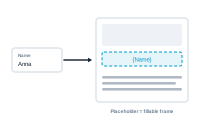
A placeholder is a spot in your layout that DataMergeStudio fills with data. It’s the bridge between a field in your spreadsheet and a place on the page.
Think of a placeholder as a labelled slot in your design that says "data goes here." When you merge, each record’s value drops into that slot, and the surrounding design stays put. One placeholder, filled differently for every record, is what turns one layout into hundreds of documents.
A placeholder can hold more than a line of text. Depending on what the slot is for, it can receive:
A placeholder isn’t tied to a field until you connect it. That connection is your mapping: which field feeds which placeholder. Autolink can make most of those connections for you by matching names, and you can adjust any of them yourself.
Look at a single placeholder up close: Inspecting and Editing a Single Placeholder