
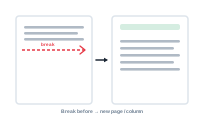
In a flowing layout, content normally runs continuously. A "break before" rule lets you interrupt that flow on purpose – forcing something to start at the top of a new page, frame, or column.
Continuous flow is what you want most of the time, but not always. Sometimes a new section should start cleanly:
A break before handles these cases without you nudging content by hand.
Applied to a block, "break before" pushes it to the start of the next page, frame, or column – you choose which. Everything after it continues flowing normally from that fresh start. It’s the flow-mode equivalent of a page or column break in a word processor, but driven by your merge rather than typed in.
Because it’s part of the merge, a break can be tied to your data – for example, starting a new page whenever a category value changes – so the structure of your publication follows the structure of your records.
Break before is a Layout Flow feature: it acts on layout blocks as they flow, not on the other merge modes.
That completes the layout building blocks. To see how flow becomes finished pages at merge time, see Layout Flow Mode: Catalogs and Continuous Layouts in the Export section, or revisit How DataMergeStudio Works.