
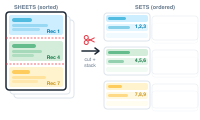
Cut & Stack is an advanced sorting aid for pre-press operators. When many-up sheets are printed, stacked, and guillotine-cut into piles, it orders the records so that – after cutting and stacking – each pile comes out in sequence.
By default, records merge continuously, in the order you arranged the copies on the sheet. Stack those printed sheets and cut them apart, and the piles come out jumbled. Cut & Stack instead distributes records across the sheets so that, once the sheets are stacked on top of each other, sequential records sit directly above one another. Cut the stack, and each resulting pile is already in order – the printer ends up with several stacks, each correctly sequenced.
Cut & Stack becomes available in Imposition – when you’ve chosen multiple records per page with a layout you’ve arranged. Open its settings and enable the assistance.
On top of the copies you’ve arranged on the sheet (the records per layout), you set:
As an illustration, 200 records with 3 records per layout, 10 layouts per set, and 5 sets per stack determines exactly how the sheets are built, stacked, and cut.
When the total doesn’t divide into equal stacks, the leftover – the last stack – can be handled three ways: Full Stack, Full Set, or Fill Sheet. They’re covered next.
Choose how the last stack is handled: Cut & Stack: Full Stack, Full Set, or Fill Sheet