
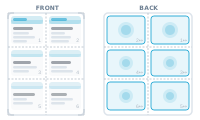
Imposition mode places many records on one sheet, arranged exactly how you lay them out – the mode for business cards, labels, badges, and tickets printed many-up.
You design one set – say a business card – and group it, so DataMergeStudio knows those placeholders belong together. Then you duplicate that group as many times as you need on the sheet and position each copy where you want it. You have full control over the arrangement.
The order in which you arrange the copies is the order records are merged into them. Records are taken by id, ascending, and poured into the copies in your arranged sequence – left to right, top to bottom, or whatever you chose. (Mind mirrored backs: for the rear of a card you’d arrange the copies right-to-left so they line up after printing.)
Print many sheets and cut them into ordered piles, and the sequence across sheets matters. That’s what Cut & Stack handles.
Keep cut piles in order: What Is Cut & Stack, and When to Use It