
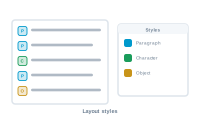
Layout styles are how your merged documents stay consistent and on-brand. Rather than format each value by hand, you lean on InDesign’s styles and apply them through your merge.
DataMergeStudio works with the styles you already define in InDesign:
Because the styling lives in InDesign, your output inherits your existing design system automatically – change a style once, and every merged document follows.
Styles aren’t only set in the layout up front; they can also be applied as part of the merge logic, so the right style lands on the right content. That’s how a value can be formatted differently depending on what it is – for example, emphasizing one field or giving a table row its own look.
Styles keep large runs consistent and easy to change. Adjust a paragraph or object style, re-run the merge, and hundreds of documents update together – no manual reformatting, no drift between records.
Show or hide parts of your design per record: Controlling Layers from Your Data