
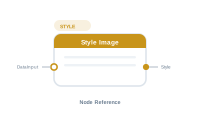
Lede. Applies an InDesign object style and overrides image fit / alignment on the placeholder.
Group: Style · Available in: Image Placeholder · Central node: No
Add Node ▸ Style ▸ Style
The node carries an object-style reference and optional image-fit + image-alignment overrides. Wire its Style output into the Image placeholder’s Style socket.
The DataInput socket is a conditional gate identical to Style Text’s: when non-empty upstream value, apply; otherwise, suppress.
| Direction | Name | What it does | What you can connect |
|---|---|---|---|
| Input | DataInput |
Conditional gate. Optional. | Any text-producing node. |
| Output | Style |
Object-style + fit / alignment directive. | Image Placeholder’s Style socket. |
| Setting | What it does |
|---|---|
| Object style | Pick one of the document’s object styles. |
| Image fit | Override the placeholder’s default fit mode. |
| Image alignment | Override the placeholder’s default alignment. |
Scenario. Apply a Polaroid object style only on records flagged as new.
Wiring.
[Data Image] → [Placeholder.Content]
[Data Text: IsNew] → [Style Image: "Polaroid"] → [Placeholder.Style]
📷 Screenshot [NEU]: Style Image settings panel