
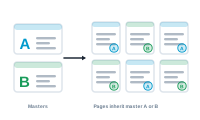
A master spread is the template behind your pages – margins, columns, running headers, page numbers. In flow mode it matters more than usual, because new pages are created from it as your content grows.
In InDesign, a master spread (or parent page) defines the recurring furniture of a page: the column grid, margins, and anything that should appear on every page, like a header or folio. Ordinary pages inherit that setup from their master.
When records flow and fill a page, DataMergeStudio needs more pages – and it builds them from your master spread. That means the master defines the shape of the entire flowing publication: get the columns and margins right on the master, and every generated page follows automatically. Get them wrong, and the problem repeats on every page.
See the frame your content actually flows into: The Primary Text Frame, Explained