
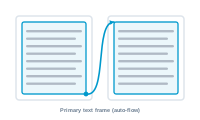
The primary text frame is the channel your content flows through. It’s the InDesign frame that catches the flowing blocks and, when it fills up, hands off to the next page.
A primary text frame is a special text frame tied to the master spread. Content poured into it flows automatically: when one page’s frame is full, InDesign continues into the primary text frame on the next page, adding pages as needed. It’s the mechanism that makes "endless" flowing layouts possible.
In Layout Flow Mode, your records – packaged as layout blocks – flow into the primary text frame. As blocks accumulate and one page fills, the flow carries on to the next page, which DataMergeStudio creates from your master spread. The primary text frame is what links page to page so the publication can grow to whatever length your data requires.
Control where things start fresh: Break Before: Forcing a New Page, Frame, or Column