
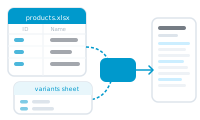
When a single table can’t hold everything a record needs, you spread your data across several sheets in one Excel workbook and let DataMergeStudio tie them together. That’s a multi-sheet workflow.
One sheet, with one row per record, covers most jobs. You reach for a second sheet when a record contains a list: a product with many specs, an order with many line items, a member with several memberships. That repeating data can’t live in a single master row.
You set this up in the datasource settings after importing the workbook – see What Is a Data Group?
Because secondary sheets and data groups need multiple tables, multi-sheet workflows require an Excel workbook – one CSV can only ever be a single table. Keeping every related table in the same .xlsx keeps the whole job in one file you can reload in one step.
Start with the link that makes it all work: What Is a Data Group?