
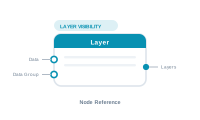
Lede. Toggles an InDesign layer’s visibility per record, optionally gated by an upstream value or data group.
Group: Layer visibility · Available in: Layer visibility editor · Central node: No
Add Node ▸ Layer ▸ Layer (inside a Layer Visibility editor).
Pick an InDesign layer in the settings panel. On evaluation the node emits a directive saying "this layer is visible for this record". The Layer Visibility central node collects all such directives across the workspace and applies them to the document during merge.
The optional Data and Data Group inputs gate the directive: an empty Data value or empty data group suppresses the layer for that record.
| Direction | Name | What it does | What you can connect |
|---|---|---|---|
| Input | Data |
Optional conditional gate. | Any text-producing node. |
| Input | Data Group |
Optional gate – directive suppressed if the data group is empty. | Data Group node. |
| Output | Layers |
The layer-visibility directive. | Layer Visibility central node. |
| Setting | What it does |
|---|---|
| Layer | Pick one of the document’s InDesign layers. |
Scenario. Render a German variant of a flyer by showing only the DE layer.
Wiring.
[Data Text: Language] → [Condition: == "DE"]
                            ├ Success → [Layer: "DE"] → [Layer Visibility]
                            └ Fail    → [Layer: "EN"] → [Layer Visibility]
📷 Screenshot [NEU]: Layer settings panel 📷 Screenshot [NEU]: Layer Visibility editor with several Layer nodes