
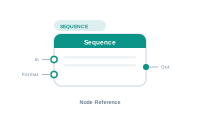
Lede. Generates a per-record number or string – the running counter for the current merge.
Group: Sequence · Available in: all text-bearing workspaces · Central node: No
A001, A002, …).Add Node ▸ Data ▸ Sequence
(Lives under Data because the Sequence category’s label is Data.)
The settings panel lets you pick a generation mode: counter, formatted counter, random, hash, …. On each evaluation the node returns the next value in the sequence for the current record. Wire the result downstream like any other text source.
The In socket is optional and accepts multiple connections – chained upstream values are concatenated before the sequence value. The Format socket applies a Text Formatter to the output.
| Direction | Name | What it does | What you can connect |
|---|---|---|---|
| Input | In |
Optional upstream text concatenated before this node’s value. | Any text-producing node. |
| Input | Format |
Formatter applied to the output. | Text Formatter. |
| Output | Out |
The generated value. | Placeholder Content, Data Text In, … |
| Setting | What it does |
|---|---|
| Mode | Counter / formatted counter / random / hash / … |
| Start value | Where the counter starts. |
| Step | Counter increment. |
| Pattern | Format string when applicable (e.g. A000 for zero-padded letters + digits). |
Scenario. A serial number S-001, S-002, … per generated PDF page.
Wiring.
[Static Text: "S-"] → [Sequence: counter, start=1, pattern="000"] → [Placeholder.Content]
📷 Screenshot [NEU]: Sequence settings panel