
Lede. Transforms text – case, padding, replace, regex, date formatting, custom rules – before it reaches the placeholder.
Group: Formatter · Available in: all text-bearing workspaces · Central node: No
EUR before display).Add Node ▸ Style ▸ Format
The node configures one or more Options (each is a single transformation rule, e.g. "uppercase", "replace", "regex"). On evaluation, the rules run in order against the input value.
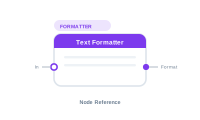
Wire the node’s Format output into another node’s Format socket (Data Text, Static Text, Sequence, Placeholder, …). Multiple formatters can be chained into the same Format socket – they apply in connection order.
The node also has an In socket. Wiring values into In lets the formatter receive an upstream value directly – mostly useful for pre-formatting chains. Multiple inputs are accepted and concatenated.
| Direction | Name | What it does | What you can connect |
|---|---|---|---|
| Input | In |
Optional upstream value to format. Multiple connections concatenate. | Any text-producing node. |
| Output | Format |
Formatter directive. | Any Format socket downstream. |
| Setting | What it does |
|---|---|
| Options list | Add / reorder / remove transformation rules. Each rule has its own parameters (regex pattern, replacement string, date locale, …). |
| Text resize | When wired into a placeholder via the placeholder’s Format socket, lets the placeholder auto-resize its frame to fit content. |
Scenario. A price column 19.99 should display as EUR 19.99 with two decimal places.
Wiring.
[Data Text: Price] → [Placeholder.Content]
[Text Formatter: prefix "EUR ", number pattern "0.00"] → [Placeholder.Format]
Format socket.📷 Screenshot [NEU]: Text Formatter settings (Options list) 📷 Screenshot [NEU]: Text Formatter chained into a Data Text → Placeholder