
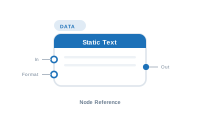
Lede. Emits a fixed piece of text that doesn’t depend on the datasource.
Group: Data · Available in: Text / Image / QR / Barcode placeholders, Table · Central node: No
[Input]) mode.Add Node ▸ Data ▸ Static Text
You type the text in the settings panel; the node emits exactly that string for every record. A connected Formatter modifies the value before it leaves the node. Like Data Text, the In socket lets you chain upstream text – Static Text concatenates its own value after the chained value.
| Direction | Name | What it does | What you can connect |
|---|---|---|---|
| Input | In |
Text chained from an upstream node; concatenated before this node’s value. | Any text-producing node. |
| Input | Format |
Formatter applied to the output. | Text Formatter node. |
| Output | Out |
The (chained-)text + the static value. | Placeholder Content, another Data Text, … |
| Setting | What it does |
|---|---|
| Text | The literal string this node emits. |
Scenario. Output: Price: 19.99 EUR where price is dynamic.
Wiring.
[Static Text: "Price: "] → [Data Text: Price] → [Static Text: " EUR"] → [Placeholder.Content]
Format.📷 Screenshot [NEU]: Static Text settings panel