
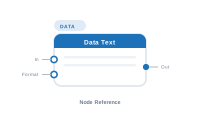
Lede. Reads one column’s value from the current record and forwards it as text into the placeholder pipeline.
Group: Data · Available in: Text / Image / QR / Barcode placeholders, Layout flow, Filename · Central node: No
FirstName + " " + LastName.€ prefix, excl. VAT suffix).[Input] mode.Add Node ▸ Data ▸ Data (the menu label is "Data"; the node’s display name is Data Text).
Pick a column in the settings panel; the node emits that column’s value for the current record. Multiple Data Text nodes wired in series concatenate their outputs left to right – the chain is the most common way to assemble a multi-part string. A connected Formatter modifies the chained value before it leaves the node.
Set the column to [Input] instead of a real column to pass through the upstream value unchanged – useful when you only want to add a prefix or suffix, or apply a formatter to text that originates elsewhere.
When the central placeholder has a Repeater wired in, the column popup automatically lists the secondary sheet’s columns and the node reads from that sheet during iteration. No setting changes required – the picker switches with the wiring.
| Direction | Name | What it does | What you can connect |
|---|---|---|---|
| Input | In |
Text chained from an upstream node; concatenated with this node’s value. | Any text-producing node (Data Text, Static Text, AI, Sequence). |
| Input | Format |
Formatter applied to the output. Multiple formatters chain in order. | Text Formatter node. |
| Output | Out |
The resulting text. | Placeholder Content, another Data Text In, Static Text, Hyperlink gate, … |
| Setting | What it does |
|---|---|
| Column | The datasource column to read. [Input] switches the node to pass-through mode. |
| Prefix | Text prepended to the column value. |
| Suffix | Text appended to the column value. |
| Allow empty value | When on, an empty cell is silently accepted. Off (default): empty triggers the placeholder’s error path. |
| Ignore input | When on, the chained In value is discarded; only this node’s column value is emitted. Becomes available once an upstream wire is connected. |
| Apply format to selected data only | When on, a connected Formatter is applied only to this node’s column value (not to chained input). |
Scenario. Build the line Product: <SKU> – <Name>.
Wiring.
[Static Text: "Product: "] → [Data Text: SKU] → [Data Text: Name] → [Placeholder.Content]
Settings on the Name node. Prefix: –. Suffix: empty.
Result for SKU A123, Name Bolt M4: Product: A123 – Bolt M4.
Error Action socket then takes over (e.g. Remove text frame, Use fallback text).Format.📷 Screenshot [NEU]: Data Text settings panel
📷 Screenshot [NEU]: Chain example: Static Text → Data Text → Data Text → Placeholder