
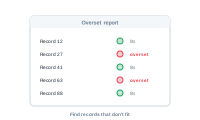
The Overset Report lists every record whose text didn’t fit. It’s shown after a run, so you can find and fix the problem records before they reach print.
The Overset Report is its own view, shown after the merge – not part of the error log. Whenever there’s overset text, it appears with a clear, dedicated list of what didn’t fit.
📷 Screenshot [NEU]: the Overset Report listing the affected records
Go straight to each affected record, see what overflowed, and decide how to handle it:
The goal is an empty Overset Report – every record’s text fitting its frame. When it’s empty, you know nothing was silently cut off, which is the whole point of catching overflow on screen instead of in print.
That completes the export pipeline: datasource, layout, node editor, and export.