
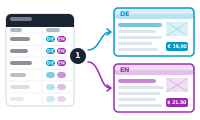
Variants are defined in the node editor, but they’re produced here, at export. A single run can output every variant, each as its own set of files.
When your project has variants, exporting runs them all in one go. Each variant produces its own files, distinguished by its file suffix (de, en, …) added at the end of the name. No separate runs, no manual switching.
The same Manage Variants list from the editor is available in the export area, so you can review or adjust your variants right where you produce them – names, suffixes, locales, and colours.
Find text that didn’t fit: What Is Text Overflow, and How DataMergeStudio Detects It