
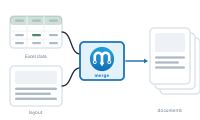
Pressing Merge is where everything comes together: DataMergeStudio runs your graph over your data and produces finished documents. This page is the overview; the details follow in the rest of this section.
Before starting a merge, DataMergeStudio validates all placeholders for all selected record (ranges). If it finds an issue it will open the log telling you exactly what and where (with the possibility to jump there).
DataMergeStudio then works through your records one at a time (or in batches depending on your settings). For each, it pulls the values your graph needs, runs your logic, styles, formatting etc., fills the layout, and adds the result to the output according to your merge mode. When it finishes, an Overset Report flags any records whose text didn’t fit; if something went wrong during the run, the Log opens with the details.
Before you press Merge, a few settings decide the outcome:
The rest of this section walks through each.
Start with the choice that shapes everything: Choosing a Merge Mode