
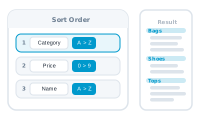
“Sorted” rarely means one column. A catalog runs by category, then by price within the category, then alphabetically to break ties. A single sort key gets you a jumble with good intentions.
DataMergeStudio sorts on as many levels as you need: each entry picks a column and a direction, and they apply top to bottom – the first is the primary sort, each further level breaks the ties of the one above. Region, then name within region. Category, then price, then product name.
Sorting never touches your source file. It hands the merge a sorted view, so your spreadsheet stays exactly as delivered – and when you reload next month’s data, the sort preference still applies. That order carries through everything downstream: documents come out in sequence, and Imposition or Cut & Stack lay records down exactly as intended.