
You know the ritual. Someone renames a column in the spreadsheet, and your entire merge setup collapses. Or you nudge a text frame, and half your placeholders quietly lose their connections – discovered, naturally, 300 pages into the output. InDesign’s built-in Data Merge treats every change as a reason to start over.
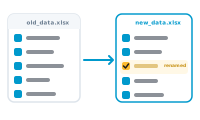
DataMergeStudio ties placeholders to data fields in a way that survives the normal churn of real projects. Connect an Excel spreadsheet or CSV file to your layout today, reload next month’s data tomorrow – the field mapping carries over. Restyle the layout, move frames, adjust the design – your connections hold. Rename or rearrange columns – matches are kept wherever they still make sense.
Resilient Mapping isn’t magic, and it doesn’t pretend to be. When a field genuinely can’t be matched anymore – a column renamed beyond recognition, or gone entirely – DataMergeStudio tells you before the merge, not after. One screen, re-assign just that field, done. You fix what actually changed instead of rebuilding everything that didn’t.
This is the difference between a layout you build for one job and a layout you run for years. Set up your InDesign data merge once, then keep feeding it new Excel data and evolving designs – the setup work compounds instead of evaporating.