
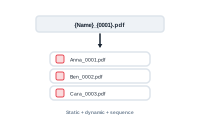
What your exported files are called depends on your merge mode – a comfortable node editor when you produce one document per record, and a simple static name otherwise.
When you’re in Individual mode with Set Size 1 – exactly one document per record – DataMergeStudio gives you a node editor for the filename. You build the name from your data and other nodes, just like building merge content, so each file can be named from its own record: an order number, a person’s name, a SKU. It’s the comfortable way to get meaningful, per-record filenames.
In every other merge mode, files use a static name plus a sequential number. You set the base name and DataMergeStudio appends a running count:
datamergestudio_1datamergestudio_2datamergestudio_3The default base name is datamergestudio, which you can change to whatever suits the job.
When variants are active, each variant’s file suffix is added at the very end of the name – so the German variant of order_42 becomes order_42_de. That keeps every variant’s files distinct and grouped.
Export only part of your data: Exporting a Range of Records