
Creating an InDesign book from your merge

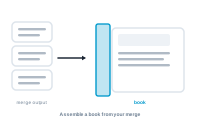
Merge output assembled into an InDesign book

DataMergeStudio can collect the InDesign documents from your merge into a book automatically – one organised publication instead of a pile of files.

Before you start – produce InDesign files

A book is built from InDesign files, so your export must produce them. There are two ways:

  • export to InDesign – this produces the InDesign files directly (no extra option needed); or
  • export to PDF with "keep InDesign files" enabled.

Step 1 – Create a book from the merge

When your export produces InDesign files, have DataMergeStudio create a book (.indb) from them.

📷 Screenshot [NEU]: the create-book option in the export settings

Step 2 – DataMergeStudio assembles the book

Every generated InDesign document is added to the book in order, ready to open and treat as one publication.

📷 Screenshot [NEU]: the resulting .indb book opened in InDesign

When to use it

  • You want continuous page numbering across all the merged documents.
  • You’ll continue in InDesign and want combined output across the whole run.

Next

Clean up your output text after the merge: GREP after merge

Not found what you're looking for?

Export & Merge · Last updated 1 month ago

Copyright ToolboxCode UG