
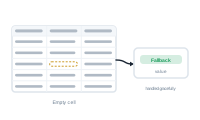
Real spreadsheets have gaps – a missing middle name, a product without an image, an optional field left blank. This page explains what an empty cell means for your merge and how to handle it cleanly.
When a record’s cell is empty, the field it feeds has nothing to place. For plain text, that usually just means the spot comes out blank – often perfectly fine.
The trouble starts when something downstream needs a value and doesn’t get one – for example, an image whose file path is blank, or a step that can’t run without input. Left unhandled, cases like these surface as errors after the merge, in the Log.
Rather than let gaps cause errors, you decide what should happen when a value is missing. In the node editor, action nodes are built exactly for this: they catch a missing value and let you recover – substitute a default, skip the element, or take an alternate path – so an empty cell becomes a deliberate outcome instead of an error.
Handled this way, empty cells stay out of the Log, and your output stays clean even when the data isn’t perfect.
Where a blank value is genuinely fine, turn on Allow empty value in the node’s settings. With it enabled, a missing value no longer raises an error – it’s simply recorded as empty and the merge carries on. Use it for fields that are legitimately optional, and keep action nodes for cases where you’d rather substitute a default or take another path.
Update your data and merge again without redoing your setup: Reloading a Datasource Without Losing Your Mapping.