
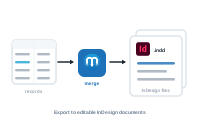
Sometimes you don’t want a PDF – you want editable InDesign documents straight from your merge. The InDesign export produces native .indd files you can open and keep working on.
In the export settings, open Format and choose InDesign as the filetype. The merge produces native InDesign (.indd) documents instead of PDFs.
📷 Screenshot [NEU]: Export → Format with InDesign chosen
How the output is divided – one document per record, a fixed group each, or everything in one – comes from your merge mode, not the format. The InDesign export simply renders whatever the mode produced as .indd files.
You don’t need the keep InDesign files option for this – that one keeps .indd files alongside a PDF export, whereas this exports InDesign files directly.
Collect the documents into one publication: Creating an InDesign book from your merge