
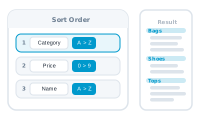
Sorting and filtering shape the record set handed to the merge – which records run, and in what order. Both live in the Datasource area, and neither touches your original data.
Choose a column to sort by and whether to sort ascending or descending. DataMergeStudio supports multi-level sorting, so you can sort by more than one column at once – for example by region first, then by name within each region. The merge then runs through your records in that order.
Sorting doesn’t change your datasource itself. It provides a sorted view to the merge process, so your source file stays exactly as it was. Reload fresh data and your sort preference still applies.
Narrowing which records run is also done in the Datasource area. Filter the set down to the records you want, and the merge runs on just those – the rest are left out without changing your source data. The editor’s preview can then step through only the filtered records, via its Consider filter settings option (on by default).
See how record counts are reported: Record Counts