
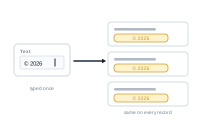
Not everything in a merged document has to come from your spreadsheet. Static text lets you supply a fixed value yourself – the same for every record, with no column required.
Some content is constant across the whole run: a fixed label, a standard disclaimer, a unit like "€" or "pcs", a campaign name. Rather than add a column that repeats the same value in every row, you set it once as static text.
Static text is its own node with a text field: you type the fixed value, and it outputs that same value for every record – no column required.
Static text isn’t the only way to add fixed text. Many nodes carry Prefix and Suffix settings that wrap whatever the node outputs with fixed text – perfect for a currency symbol, a unit, or a label added straight onto a data field’s output, without a separate node.
So: use the static text node for a standalone fixed value; use prefix/suffix to enrich a data field’s output in place.
Reach for static text when a value:
If the value ever needs to vary per record, use a data field instead so it stays driven by your spreadsheet.
See what happens when a data field has no value: Empty Cells.