
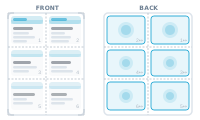
Business cards, labels, badges, tickets: jobs where one record per page would waste most of the sheet. InDesign’s own answer – multiple records per page – snaps everything into a rigid grid with margins doing the deciding. Mirrored backs for duplex printing? You’re on your own.
In DataMergeStudio you design one item, group it as a set, and duplicate that group across the sheet – each copy positioned exactly where you want it, no grid dictating the layout. Records then fill your copies in the order you arranged them, by id ascending: left to right, top to bottom, or whatever sequence you chose.
Because the arrangement order is yours, duplex work stops being guesswork: arrange the rear copies right-to-left, and fronts and backs line up after printing. The result is a press-efficient sheet that carries many records, ready to print and trim – and if the job continues into guillotine-cut piles, Cut & Stack picks up exactly where Imposition ends.