
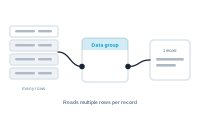
The data group node is how a record’s related rows enter the workflow. It’s the editor side of the data groups you set up in your datasource – the bridge that lets one record work with its many secondary rows.
In the data group node, you select a data group – one you created earlier in the Datasource area, where you defined the link between the master sheet and a secondary sheet. The node then represents that relationship in the editor, ready to deliver the secondary sheet’s rows.
Connecting a data group to the central node changes the workflow’s context from the master sheet to the secondary sheet chosen in that data group. From that point, the workflow runs over the secondary rows, which the data group delivers for the current master record. This is currently supported for the table node, which is how a record’s many rows become the rows of a table – while you still steer which master record you’re viewing through the preview.
The classic result is a table that grows with the data: one product document showing its full spec table, one invoice listing every line item. The data group node is what makes "a list within a record" possible – the thing InDesign’s built-in merge can’t do.
Extend the editor with your own code: Custom JavaScript Node