
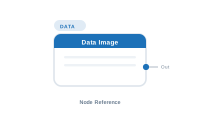
Lede. Resolves an image for the current record – from a column reference, a folder lookup, or a manually chosen path.
Group: Data · Available in: Image Placeholder · Central node: No
Filename column relative to a configured image folder.Add Node ▸ Data ▸ Image
In its settings panel you pick how images are resolved:
The node emits a reference to that image; the Image placeholder places it in InDesign with the fit / alignment from the placeholder’s settings (overridable via a Style Image node).
| Direction | Name | What it does | What you can connect |
|---|---|---|---|
| Output | Out |
The resolved image reference. | Image Placeholder’s Content socket. |
The node has no input sockets.
| Setting | What it does |
|---|---|
| Source | From column / From folder / Manual. |
| Image folder | Root directory the column/folder lookups resolve against. |
| Column | (Source = column) Column that contains the filename. |
| Match column | (Source = folder) Column the lookup compares filenames against. |
| Allow missing | When on, missing images are silently accepted (the placeholder stays empty). |
Scenario. A product catalogue where each row has an ImageFile column referencing files in Photos/.
Wiring. [Data Image] → [Placeholder.Content].
Result. Each record’s image is loaded from <configured base>/Photos/<ImageFile>.
Error Action socket can absorb it (e.g. Remove frame, Use fallback image).Manual – switch to From column / From folder.📷 Screenshot [NEU]: Data Image settings panel