
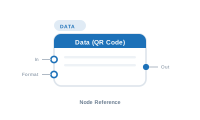
Lede. Reads a column value from the current record and forwards it as the QR-code payload.
Group: Data · Available in: QR Code Placeholder · Central node: No
Add Node ▸ Data ▸ Data
This is the same node class as Data Text, exposed under the Data category of QR-code placeholder workspaces. The QR code is rendered by InDesign from the text value this node emits.
Identical behaviour to Data Text: pick a column, optionally chain upstream input and apply a Formatter. The emitted text becomes the QR code’s payload.
| Direction | Name | What it does | What you can connect |
|---|---|---|---|
| Input | In |
Chained text from an upstream node; concatenated. | Any text-producing node. |
| Input | Format |
Formatter applied to the value. | Text Formatter. |
| Output | Out |
The text used as the QR-code payload. | QR Code placeholder’s Content. |
Same as Data Text.
Scenario. A product label that includes a QR code linking to the product page.
Wiring.
[Static Text: "https://example.com/p/"] → [Data Text: SKU] → [Placeholder.Content]
In a QR-code placeholder the chain looks identical to a text placeholder; the central node decides to render the result as a QR image.
Same as Data Text. The placeholder’s Error Action socket handles empty / invalid payloads.
📷 Screenshot [NEU]: Data node panel inside a QR-code placeholder workspace