
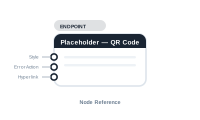
Lede. The central node of a QR-code placeholder workspace – everything you wire here drives the generated QR code in the corresponding InDesign frame.
Group: Endpoint · Available in: QR Code Placeholder workspace · Central node: Yes
Auto-created when you open a QR-code placeholder editor.
The placeholder pulls dynamic QR-parameter inputs (added by the QR-code type), a Style modifier, an Error Action, and a Hyperlink. The QR payload itself comes from those QR-specific inputs (e.g. URL, vCard fields, …) configured on the placeholder rather than from a Content socket.
| Direction | Name | What it does | What you can connect |
|---|---|---|---|
| Input | Style |
Object style for the frame. | Style Object. |
| Input | ErrorAction |
What to do when payload is empty. | Action Text Frame. |
| Input | Hyperlink |
URL attached to the QR-code frame (separate from the payload). | Hyperlink node. |
| Input | (QR parameter sockets) | One per parameter of the selected QR type (URL, contact name, …). | Data Text, Static Text, AI. |
No output sockets.
[Data Text: ProductURL] → [Placeholder.URL]   (QR parameter socket)
[Style Object: "QR Shadow"] → [Placeholder.Style]
📷 Screenshot [NEU]: QR-code placeholder editor with parameter sockets