
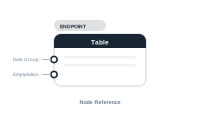
Lede. The central node of a Table placeholder workspace – iterates a data group and emits one row per match into the InDesign table.
Group: Endpoint · Available in: Table workspace · Central node: Yes
Auto-created when you open a Table placeholder editor.
Wire a Data Group node into Data Group. The Table iterates over the matching rows for the current master record, pulling each column socket once per row. Whatever the column sockets emit fills the corresponding column in the generated table.
The Empty Action socket fires when the data group returns no rows for the current master record.
| Direction | Name | What it does | What you can connect |
|---|---|---|---|
| Input | Data Group |
The set of rows to iterate. Required. | Data Group node. |
| Input | EmptyAction |
What to do when no rows match. | Action Table. |
| Input | (column sockets) | One per generated column. Pulled per row. | Data Text (table), Static Text, AI. |
The column sockets are added by the table workspace based on the InDesign table layout; they don’t appear in the static registration.
No output sockets.
[Data Group: "Order lines"]      → [Table.Data Group]
[Data Text (table): Description] → [Table.Column 1]
[Data Text (table): Amount]      → [Table.Column 2]
[Action Table: "Fallback row"]   → [Table.EmptyAction]
Data Group connection: invalid; nothing flows.EmptyAction decides (remove table, fallback row, report error).📷 Screenshot [NEU]: Table workspace with data group + column wiring