
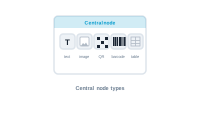
A central node is the endpoint of a workspace – the spider every thread runs to. Which kind of central node you use depends on what that workspace produces. There are five.
Each workspace has exactly one central node, and it’s one of these types – whichever matches what you’re producing.
A central node is the destination, so it has no output socket. Data, styles, hyperlinks, and actions flow into it along the graph; nothing leaves the other side. That’s the visual giveaway that you’ve found the endpoint: wires arrive, none leave.
A central node takes the value it should place – pulled from your datasource, and optionally shaped by upstream nodes first (formatted, decided, restyled) – and renders it in the layout. Everything else in the graph exists to feed it.
Table is the special one: connect a data group to it and the workspace’s context switches to the secondary sheet, so the table fills with a record’s many related rows. It’s how "a list within a record" becomes a real table.
See the nodes that bring values in: The Data Nodes