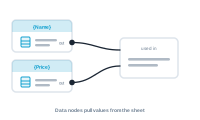
Data nodes are where values enter the editor. They read from your datasource so the rest of the graph has something to work with – the opposite end of the flow from the central node.
The data nodes
- Data – selects a column from your datasource and brings its value into the graph. This is the everyday source node: point it at a column, and that column’s value for the current record flows onward.
- Image – selects an image column, and defines how to read it: whether the column holds just an image name, a full path, or a URL (which DataMergeStudio downloads). That’s how DataMergeStudio knows where to find the picture for each record.
How they fit the flow
A data node sits at the start of a chain. Its value flows toward the central node, optionally passing through formatting, conditions, or styling on the way. Where the central node places the result, a data node supplies the raw value.
Image sources: name, path, or URL
Image references come in different shapes, so the Image data node lets you say which you have:
- a name – you also choose the folder the images live in (in InDesign this is often a Links folder), and the name is matched to a file there;
- a path – used as the location directly;
- a URL – downloaded, so images can come straight from the web.
Choose the right one and every record’s image is found the same, reliable way.
Next
Control the look of what gets placed: The Style Nodes