
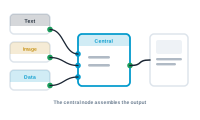
Every workspace has exactly one central node – the endpoint everything else builds toward. Picture it as the spider at the center of the web: every thread runs to it, and it pulls the data in. It also sets the context your whole workflow runs in.
Where your other nodes read, format, and decide, the central node is the destination. In the pull model, it’s the node that asks for a value, sending that request back up the chain. Build your nodes toward the central node, and the central node pulls the finished result out of them. Being the destination, it has no output socket – everything flows into it, and nothing leaves the other side.
By default, a workflow runs in the context of the master sheet – so the central node works through your main records, one per merge. That default is what makes "one row, one record" happen without you configuring anything.
The context isn’t fixed. When you connect a data group to the central node, the workflow’s context switches to the secondary sheet chosen in that data group – from that point, the whole workflow operates on the second sheet’s rows, which the data group delivers for the current record. This is currently supported for the table node, which is how a record’s many related rows become the lines of a table. You still steer which master record you’re looking at through the preview.
The central node is the single most important node to locate in any graph: find it, and you know what the workflow produces and which data it’s running over. Everything else is in service of feeding it.
A central node is always one of a few types, depending on what it places: Central Node Types: Text, Image, QR, Barcode, and Table