
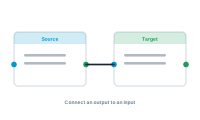
Connecting nodes is how you build a workflow, but not every socket can join to every other. A few simple rules keep your graph valid.
The basic move is always the same: drag from a node’s output socket to another node’s input socket. That’s the direction data travels. You don’t connect two outputs or two inputs to each other – every connection pairs a result with somewhere to use it.
Connections also have to match by socket type. Each socket carries a kind of content – data, style, action, or hyperlink – and you connect like to like: a style output into a style input, data into data. The editor only lets a connection form when the types fit; if a wire won’t take, a type mismatch is usually why.
Nodes with Success and Fail sockets connect the same way, but each path leads somewhere meaningful: Success to the next normal step, Fail to whatever should happen when the job didn’t work. Leaving a Fail path unconnected is fine when failure can’t happen – but for anything reading real-world data, wiring it is what keeps a single gap from stopping the run.
As graphs grow, tidy connections matter. Connect in the order the work happens, keep related nodes near each other, and let the editor help you arrange things. A graph you can read is a graph you can fix.
See the endpoint everything connects toward: What Is a Central Node?