
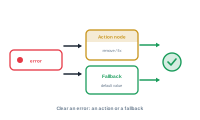
When the log flags an error – most often a missing value – you don’t have to leave it broken. There are two ways to handle it in the editor.
Use an action node to recover from the problem – for example, removing the placeholder so nothing is left dangling, or otherwise cleaning up the result. The missing data no longer produces an error, because the action deals with it.
Or detect the case and supply a fallback: a condition node spots when the value is missing, and a data node outputs an alternative value in its place. The record still gets something sensible, and the error disappears.
Both approaches genuinely handle the situation rather than hiding it. Reach for the action route when the fix is "take it out or clean it up", and for the condition-plus-fallback route when the fix is "use this value instead". A recurring error in the log is simply the prompt to add one or the other.
That’s the Log. Next comes automating DataMergeStudio from outside the app.