
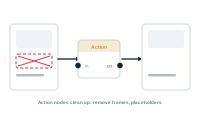
Action nodes are how you handle the messy reality of real data. When a value is missing or something can’t proceed, an action node decides what should happen – instead of letting the merge stumble.
Real spreadsheets have gaps: a missing image, an empty optional field, a value that isn’t there for this record. Left alone, some of those gaps would surface as errors. An action node steps in at that point and lets you recover gracefully – supply a default, skip an element, or take a different route – so a single imperfect record doesn’t derail the run.
This is the key effect: by catching a missing value and dealing with it on purpose, an action node keeps that case out of the error log. The Log is meant for genuine problems during a merge; action nodes are how you make sure expected, harmless gaps never get there. Handle them, and your log stays focused on things that actually need attention.
An action node carries an action output – a behaviour passed along to act on something – not plain data. It also has a data input that works as a trigger: leave it unconnected and the action runs always; connect a data node and the action runs only when data flows through that input. The data is used purely to trigger – nothing else. So you can make an action fire only under a condition by feeding its trigger from something that produces a value only when that condition is met.
The point of an action node is intent: instead of "what happens if this is empty?" being left to chance, you decide it. That’s what turns unpredictable data into predictable output.
Make decisions in your graph: What Is a Condition Node?