
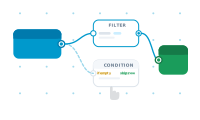
The node editor is where you describe what happens during a merge – visually, by connecting nodes, instead of writing code. It’s the brain of your project: the layout decides where content goes, and the node editor decides what that content is and how it’s built.
Open the node editor and you get a canvas. On it you place nodes – small building blocks that each do one job: read a field, format text, make a decision, generate a QR code, apply a style. You wire nodes together so the output of one becomes the input of the next, and that wiring is your merge logic.
Most data-merge problems aren’t "put this value here" – they’re "put this value here, but trim it, and if it’s empty use a default, and only show this block when that column says so." Expressing that as connected nodes keeps it readable and editable: you can see the whole flow, follow a value from source to page, and change one step without unpicking the rest.
The node editor sits between your datasource and your layout. Data comes in, your nodes shape it, and the result fills the placeholders in your layout – once per record. A couple of ideas make the whole thing tick: data is pulled through the graph on demand, and a central node sits at the end of it.
Start with the building block itself: What Is a Node?