
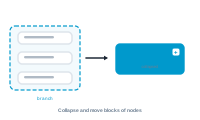
Your graph is built of branches. Like the twigs of a tree, every path runs inward to the trunk – the central node. Branches let you collapse and move those paths as blocks, so large graphs stay manageable.
At any node that has a branch feeding into it – a connection on an input socket – there’s an eye icon right next to that socket. Click it to hide the branch that feeds in. The branch still exists and still works; it’s just folded away so the canvas isn’t cluttered.
Here’s the payoff: when you drag a node whose branch is hidden, every node in that branch keeps its relative position to the node you’re dragging and moves along with it. So you can reposition a whole block of nodes in one motion, instead of dragging them one by one. While you drag, the hidden nodes are faintly shown (ghosted) so you can see what’s coming along.
Big merges grow big graphs. Collapsing the branches you’re not working on, and moving them as units, keeps even a complex workflow easy to navigate and rearrange.
Edit without fear: Undo, Redo, and Editing Safely