
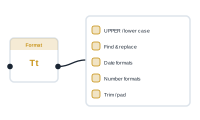
Everything below lives in the single format node. Toggle on what you need – you can combine many at once, and the node applies them together.
Change capitalisation: Uppercase, Lowercase, Title Case, Sentence Case, camelCase, PascalCase, snake_case, and kebab-case / Slug.
Find and Replace for plain text, or Regex Replace for pattern-based substitutions.
Shorten long text: Truncate / Max Length, Truncate with Ellipsis (adds …), or Word Limit (cap the number of words).
Substring / Extract – pull out part of a string using a zero-based index and a number of characters.
Pad Left or Pad Right to a desired total length, with a character of your choice. Pad Left with 0 gives 007; Pad Right with . or a space builds dot leaders or fixed-width columns.
Remove Characters, Keep Only Characters, Extract Numbers Only, or Extract Letters Only.
Normalize Whitespace (collapse runs of spaces), Strip HTML Tags, or Convert Line Breaks.
URL Encode – make a value safe to drop into a URL.
Serial Date – interpret a date with a pattern like dd.MM.yyyy. Reformat Date – convert from an input format (e.g. dd.MM.yyyy) to an output format (e.g. dd.MMMM.yy).
Format numbers as Decimal, Currency, Currency (ISO Code), Currency plural, Spellout (e.g. "forty-two"), or Ordinal (1st, 2nd, 3rd).
Reverse String, Repeat, and Default Value / Fallback (supply a value when the input is empty).
Toggle several at once and the format node applies them together – uppercase and trim, extract then pad, reformat a date and set a fallback. One node, as many transforms as the value needs.
Let AI generate or translate text for you: The AI Node