
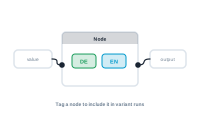
You assign each node to a variant through its Variants dropdown. A node assigned to a variant shows that variant’s colour as a tag on the node, so you can see at a glance which variant each node belongs to.
Open a node’s Variants setting and pick a variant – or leave it on All Variants (the default), meaning the node runs in every variant. For a two-language job, set the German text node to Deutsch, the English one to English, and leave everything shared on All Variants.
Variants constrain how nodes can connect, so you can’t accidentally mix them:
If you attempt a disallowed connection, the editor shows a hint – and a connection that would break the rule is removed. This keeps each variant’s path clean: a variant only ever flows through its own nodes and the shared ones.
Assign only what actually differs between variants, and leave everything common on All Variants. The fewer nodes tied to specific variants, the simpler the graph and the easier it is to add another variant later.
Check a record before you run the whole batch: Previewing a Single Record in the Editor