
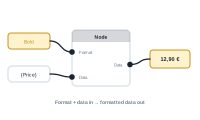
Every socket has two things worth reading: a direction and a type. Together they tell you how a node connects to the rest of your graph.
A socket also has a type – the kind of thing that travels through it. You connect sockets of the same type. The main types are:
Condition nodes are the exception. They carry Success and Fail sockets so you can route what happens when a condition is or isn’t met. Under the hood these are really Data – the same content flows through them – but they’re drawn separately so you can branch on the outcome.
Some nodes create their own sockets on the fly, with custom names – a dynamic condition node, for example, can spin up an output socket per case. However they’re labelled, these dynamic sockets are always Data sockets. The name is just a label; the type underneath is Data.
Direction tells you which way things move; type tells you what can connect to what. Read both and you can wire even an unfamiliar node correctly.
See what makes data actually move along these connections: How Data Flows Through the Editor (Pull Model)